
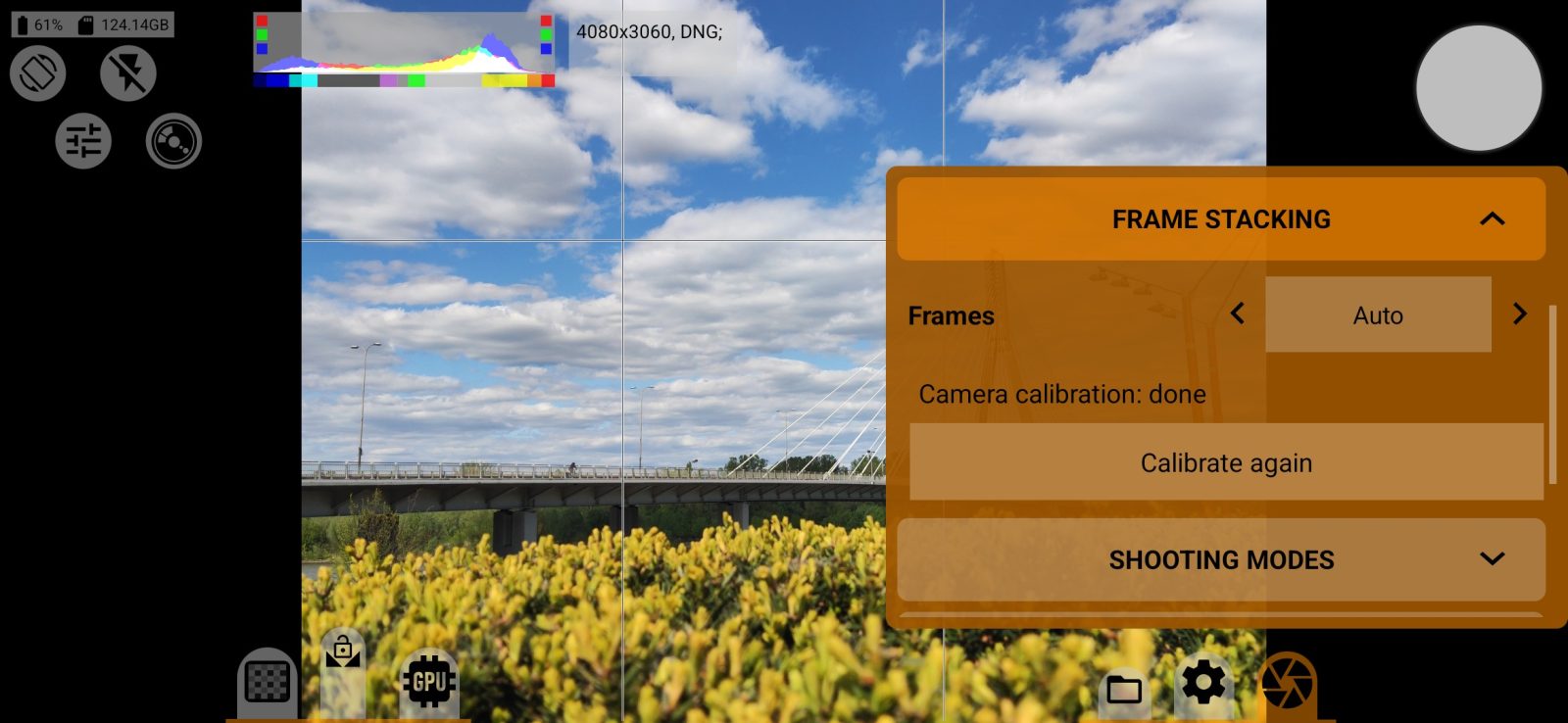
Frame stacking reduces noise in photos taken in low light. You press the shutter once and get one file, and the brightness of the photo stays the same.
This section works with the DNG format and with every format that has the "RAW developed" label. With the JPEG format its rows are grayed out, even when the Save DNG row is on.
Frames
The values are Off, Auto, 4, 8 or 16. The higher the number, the less noise, but the longer it takes to shoot and process.
With Auto, the app picks the number itself. When there is enough light, it takes a regular photo with no delay.
Hold the phone still while it shoots. Then "Stacking frames…" appears on the screen. Processing takes a few seconds, and the shutter does not respond until it is done.
Frame stacking cannot be combined with burst, bracketing, interval or the flash: while it is on, their rows are grayed out, and the other way round. The self-timer works with frame stacking.
Camera calibration
Before the first stacked photo, the camera needs a one-time calibration. The app asks you about it and tells you to put the phone on a table, screen up, so that the lenses are covered. Calibration takes less than a minute, and you do not need to touch the phone while it runs.
The status is shown below the number of frames: "Camera calibration: done" or "Camera calibration: not done". The Calibrate button starts calibration. Once calibration is done, the button reads Calibrate again.
If light reaches the lenses, calibration fails and the app tells you so.
Each camera on the phone is calibrated separately. Sometimes the app asks you to calibrate again, for example after a system update.