
In the app: microphone (audio menu)
The microphone button opens the sound settings. They are shared by all cameras. The menu does not open during recording, but headphone monitoring keeps working.
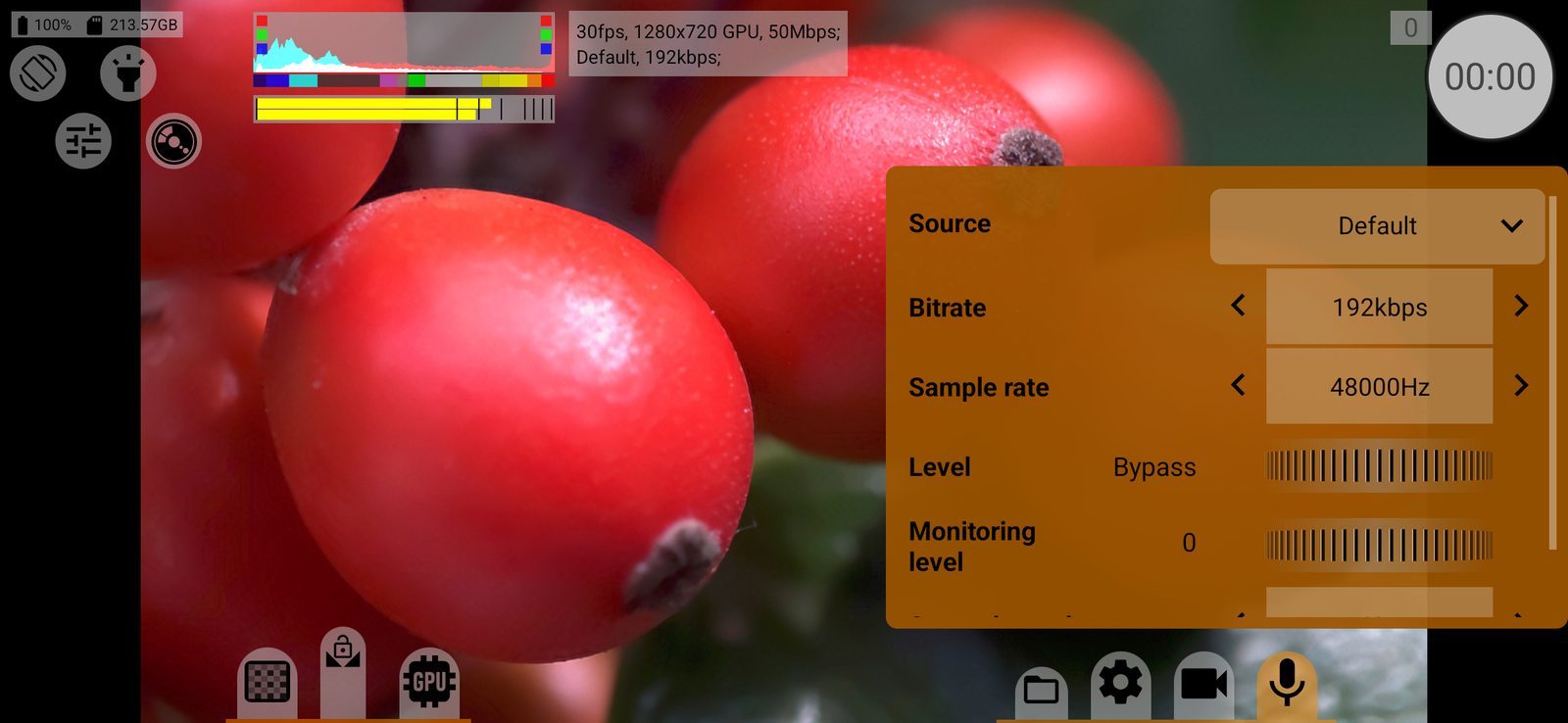
Source
Tap the value to choose from the list:
- Off: video without sound;
- Default: the phone's default microphone setup;
- Unprocessed: the raw microphone signal without the phone's processing, where the phone supports it;
- Camcorder: the microphone tuned for video recording;
- Mic: the main microphone;
- Voice: tuned for speech;
- Bluetooth: a Bluetooth headset microphone.
Which microphone a USB or wired mic replaces is decided by Android. The first time you choose a source, the app asks for the microphone permission. If an external camera is connected to the phone, sound is turned off. Default: Default.
With Off, the other rows are greyed out.
Bitrate
This row picks the audio format:
- AAC from 64 to 1024 kbps (only the rates the phone's encoder supports): compressed sound in the video file;
- PCM 16bit, PCM 32bit Float: uncompressed sound in the video file. Works with the MOV and MP4 containers; with System the recording does not start and the app shows PCM audio is not supported in the System container;
- WAV 16bit (separate file), WAV 32bit Float (separate file): sound only as a separate WAV file next to the video, without an audio track in the video.
For RAW, uncompressed sound is always saved as WAV; with .mcpro only PCM and WAV are available. Default: 192 kbps AAC, or the highest rate the phone supports below it.
Sample rate
The sample rate. For AAC, the rates the phone's encoder supports, up to 48 kHz. For PCM and WAV, higher rates up to 192 kHz are added; whether the phone's microphone can deliver them depends on the phone. Default: the highest rate supported for AAC.
Level
Digital gain applied to the recorded sound, from −100 to +100. Bypass (the middle) leaves the sound untouched; double-tap the wheel to return to it. Negative values make the sound quieter, positive values amplify it, up to about 20 times. Too much gain clips the sound. Default: Bypass.
Monitoring level
Headphone volume for listening to the sound while you shoot. The sound goes only to wired, USB or Bluetooth headsets, never to the phone's speaker. This row changes the phone's media volume. Works during recording. Double-tap the wheel to mute. Default: 0 (off).
Swap channels
No / Yes: swaps the left and right channels in the recording and in the headphones. Useful when the phone is held upside down. Default: No.