
The disk runs in the background, with an icon in the notification area next to the clock. It starts when you sign in to Windows, or from the Start menu: mcpro24fps Virtual Disk. If you start it again while it is running, its settings open.
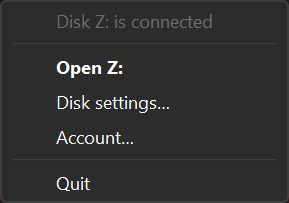
Click the icon to open the disk in File Explorer, or the settings if the disk is not connected. Right-click the icon for its menu: the state at the top, then Open with the disk letter (for example Open Z:), Disk settings…, Sign in… or Account…, and Quit, which disconnects the disk.
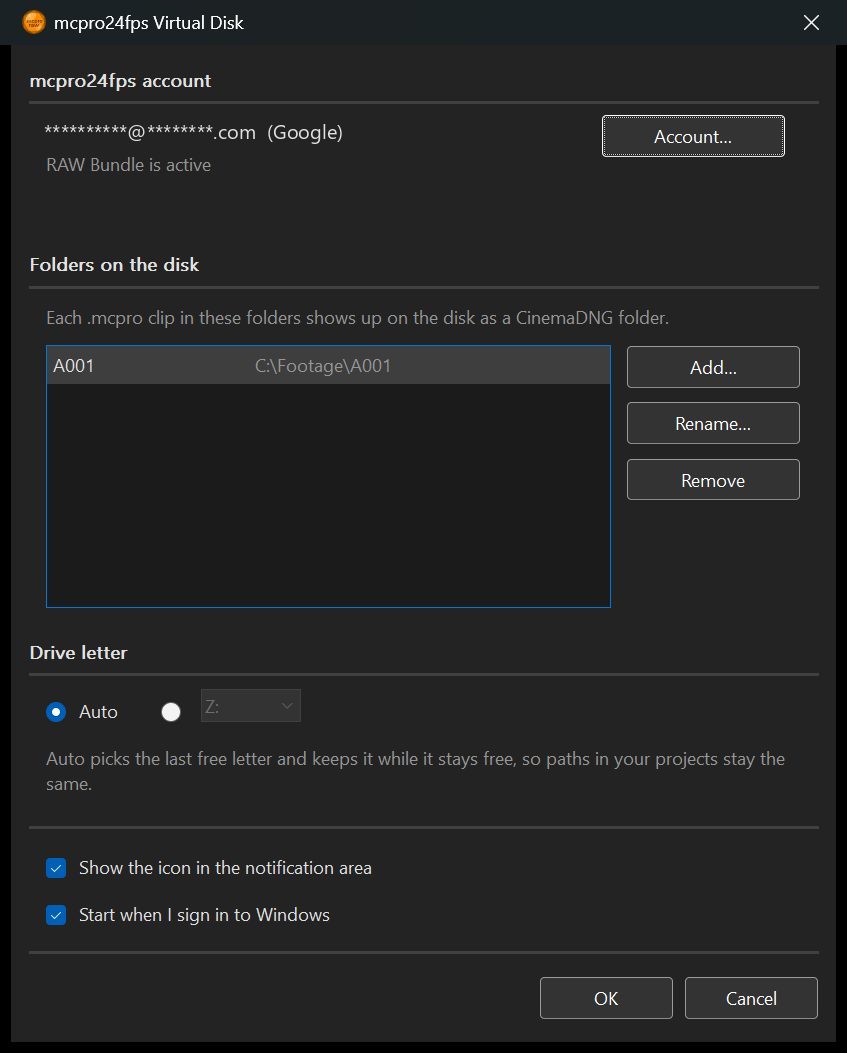
1Folders on the disk
Each .mcpro clip in these folders shows up on the disk as a CinemaDNG folder. Up to 64 folders.
- Add…: choose a folder.
- Rename…: changes the name of the folder on the disk. DaVinci Resolve projects that use clips from it will not find them under the new name, so relink them in Resolve afterwards.
- Remove: the folder disappears from the disk, and Resolve shows its clips as Media Offline. The files stay where they are.
A folder on a drive that is not connected right now is marked "(not connected)".
2Drive letter
Auto picks the last free letter and keeps it as long as it stays free, so the paths in your Resolve projects do not change. You can also choose a letter yourself. The list shows only free ones.
3The other options
- Show the icon in the notification area. Without the icon, open the settings from the Start menu.
- Start when I sign in to Windows.
Changes apply when you click OK.
What the state line says
| State | What it means | |---|---| | Disk X: is connected | Everything works. | | Starting the disk… | Wait a moment. | | Sign in to open .mcpro clips | You are not signed in with RAW Bundle. Sign in in the converter's account window, and the disk connects by itself. | | No folders yet. Add one in the disk settings. | Add a folder. | | Drive letter X: is taken by another disk | Choose another letter or Auto in the settings. | | The Dokany driver is missing. Reinstall mcpro24fps RAW Converter. | Run the installer from mcpro24fps.com again with the virtual disk ticked. | | The disk stopped. Starting it again… | The disk restarts by itself. If this repeats, write to info@mcpro24fps.com. |
If RAW Bundle runs out while the disk is connected, the disk disconnects within an hour, and Resolve shows the clips as Media Offline.